Important notes
The editor canvas stays inert on purpose
Nothing plays on the live editing canvas — the editor paints its own preview instead. Use the dock's play button, or Page Preview, to see the real animation. This is deliberate, not a bug.
Style definitions are cached
If changes stop sticking after enabling the module or editing settings,
run drush cr.
Smooth scrolling can silently fail
Lenis loads from the jsDelivr CDN; a script-src Content-Security-Policy
that omits cdn.jsdelivr.net disables it specifically — the page just
scrolls normally, and every other Motion feature is unaffected. See
Smooth scrolling for how it works.
Nothing plays on the published page
The engine ships as part of this module, so a blocked CDN cannot be the cause. Check the browser console for a JavaScript error, and confirm the page's motion library actually loaded (Network tab).
An effect is greyed out
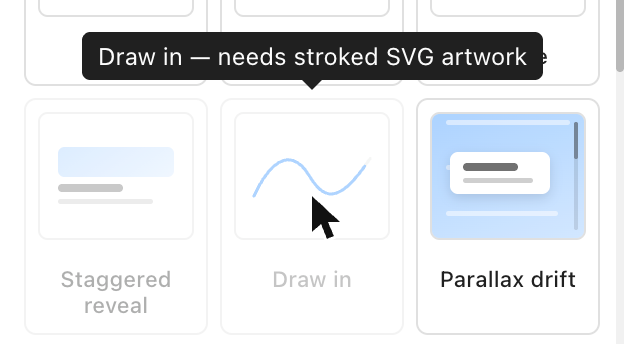
The target cannot support it — hover the tile for the reason. See When an effect is unavailable.
It only runs on some devices
Check Customize → Adjust per device for an exception, or look for a slashed device glyph on the dock row. See Per-device behaviour.
It runs but nothing moves
Check whether the animation is disabled — a dimmed row with a slashed eye icon.
A duplicated section lost its animations
Component targets survive a duplicate — a Section or Column target does not, because the copy is a different Section and a timeline belongs to one. Re-add those two on the copy.
When an effect is unavailable
Some effects need something from the target itself. Draw in animates the length of a stroke, so it needs artwork drawn with strokes; a filled icon has no line to draw.
Two cases, treated differently on purpose:
- A requirement you can satisfy from the panel — an effect needing more than one element — hides the tile. Pick another target and it returns.
- A requirement about the component's markup, which the panel cannot change, leaves the tile visible but disabled, with the reason on hover. Silently removing it would send you hunting for something that was never coming back.
Most icon sets are filled, not stroked
Bootstrap Icons, and any icon built from filled paths, cannot be drawn.
Draw in needs a stroked family — Feather, Lucide, Heroicons outline, or
hand-authored SVG carrying stroke.
Controls appear only when they can act
A control that cannot do anything is not rendered, rather than greyed out. Scroll positions exist only for a scroll trigger. Stagger exists only when the target resolves to more than one element. Repeat delay exists only when something repeats. Nothing is lost by hiding: a stored value stays stored and reappears intact when it becomes applicable again.
Per-viewport behaviour
Every value is stored per viewport and resolved mobile-first: a viewport with
no entry inherits the nearest narrower one. Switch the device picker and the
panel re-points to that viewport's values — no @media rules or generated
breakpoint classes are involved.
Reduced motion
Suppression under prefers-reduced-motion: reduce is a WCAG 2.2.2 obligation.
Site settings choose how it is honoured — When a visitor asks for reduced
motion, under Motion settings: "Fade only — no movement" (the default —
every animation drops to a plain opacity change), "Play nothing at all" (the
runtime never arms), or "Play everything anyway" (fails WCAG 2.3.3 — full
motion regardless). The per-component panel shows the site's choice as a
locked indicator, not a switch; it is a site-wide setting, not a per-component
one.
Content is never left invisible. Nothing is hidden by CSS — the from-state is applied by the engine only — so a blocked engine, a reduced-motion visitor, or a tween that throws all end with the element visible.
Horizontal scroll is skipped entirely for a reduced-motion visitor. Turning vertical scrolling into sideways travel is the most disorienting thing this module can do, and a stacked band reads fine.