Hidden children
Some containers hide most of what they hold: a carousel shows one slide, an
accordion shows one panel, a tab set shows one pane. In the editor that means
children you cannot click, because they are clipped or display:none.
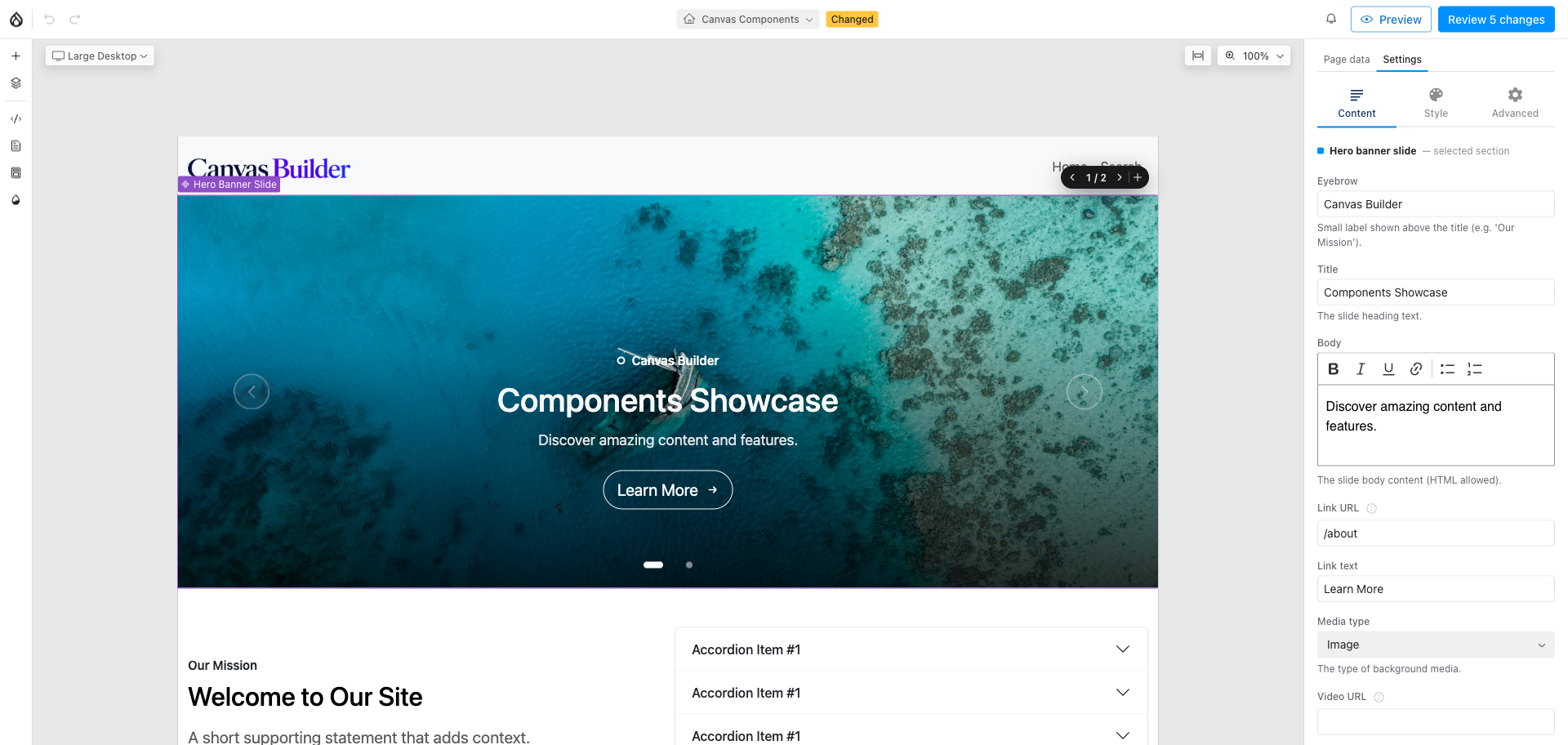
Select the container and a badge appears showing 2 / 5 with previous and next
controls. Stepping through reveals each child in turn so you can select and
edit it, then restores the container.
- It is framework-agnostic. The child count comes from Canvas's own layout
model, so it is right no matter how the children render; "which are hidden"
is pure geometry and computed style. Nothing knows about any particular
carousel library, and closed Bootstrap
collapsedescendants are detected on the same evidence. - A merely scrollable container is left alone. If the children are reachable by scrolling horizontally, revealing one would be a regression, not a help, so the badge does not appear.
- Revealing does not hide the siblings. The revealed child sits in place among the others, which is far less disorienting in an accordion.
- The
[+]inserter adds after the current item, not at the end, and jumps to what it just added, so building a five-slide carousel is five clicks in the same place rather than a hunt each time.
Where a component declares a slot contract, the badge also offers to add the recommended child for that slot directly.